
commentsのapiについてのテスト
APIのテストがもともと「request spec」と言われていた
apiのcomments_pathにrequestを送って、ステータス「200」が返ってくるかテストしたい
以下のファイルをターミナルで作成
rails g rspec:request api/commentこれでspec/requests/api/comments_spec.rbのファイルが出来上がった
RSpec.describe 'Api::Comments', type: :request do
  describe 'GET /api/comments' do
    it '200 Status' do
      get api_comments_path
      expect(response).to have_http_status(200)
    end
  end
end
このままだとデータがないので、articleとcommentのデータを作っていく
comments.rbのファイルを作成して、コメントを作れるようにする
FactoryBot.define do
  factory :comment do
    content { Faker::Lorem.characters(number: 300) }
  end
end
titleがないだけで、articles.rbとほぼ同じ
commentはarticleに紐づいているarticleはuserに紐づいている
user、article、commentを定義する
RSpec.describe 'Api::Comments', type: :request do
  let!(:user) { create(:user) }
  let!(:article) { create(:article, user: user) }
let!(:comments) { create_list(:comment, 3, article: article) }複数作るときはcreate_listを使う
どの記事にrequestを送るか明確にする
get api_comments_path(article_id: article.id)出来上がったコードがこちら↓
require 'rails_helper'

RSpec.describe 'Api::Comments', type: :request do
  let!(:user) { create(:user) }
  let!(:article) { create(:article, user: user) }
  let!(:comments) { create_list(:comment, 3, article: article) }

  describe 'GET /api/comments' do
    it '200 Status' do
      get api_comments_path(article_id: article.id)
      expect(response).to have_http_status(200)
    end
  end
endターミナルでテストを実行する
bundle exec rspec spec/requests/api/comments_spec.rb成功!

レスポンスの内容をチェックする
apiの場合、レスポンスの中身を細かくチェックすることができる
apiのテスト(検証)では、httpではなくjsonでデータが返ってくる
内容を見てみたいのでbinding.pryを挟む
RSpec.describe 'Api::Comments', type: :request do
  let!(:user) { create(:user) }
  let!(:article) { create(:article, user: user) }
  let!(:comments) { create_list(:comment, 3, article: article) }

  describe 'GET /api/comments' do
    it '200 Status' do
      get api_comments_path(article_id: article.id)
      expect(response).to have_http_status(200)

      binding.pry
    end
  end
end
そしてターミナルで実行する
bundle exec rspec spec/requests/api/comments_spec.rb処理が止まる
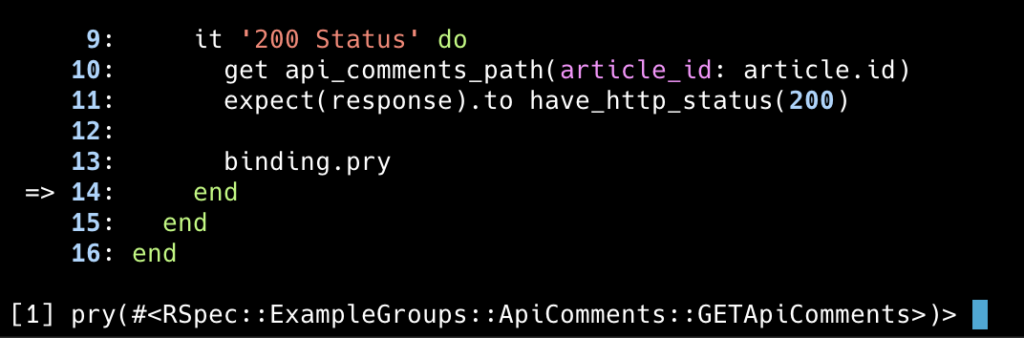
レスポンスを表示させる
[1] pry(#<RSpec::ExampleGroups::ApiComments::GETApiComments>)> response大量のデータが出てくるが、大事なのはbodyという部分になるので以下を実行する
[1] pry(#<RSpec::ExampleGroups::ApiComments::GETApiComments>)> response.bodyすると、配列のような文字列(json)が返ってくる↓

このままではかなり見にくいので見やすくする
[4] pry(#<RSpec::ExampleGroups::ApiComments::GETApiComments>)> JSON.parse(response.body)create_listで3つ作ったので、3つの配列が表示される
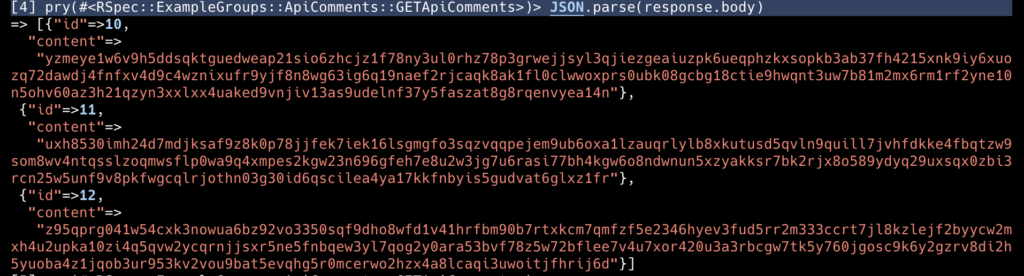
この配列の中身が、commentsの内容と一致するか確認する
200ステータスが返ってきたのでテストは成功しているが、肝心のcommentsが正しい内容か、ここで確認する
      body = JSON.parse(response.body)
      expect(body.length).to eq 3
      expect(body[0]['content']).to eq comments.first.content
      expect(body[1]['content']).to eq comments.second.content
      expect(body[2]['content']).to eq comments.third.content
body = JSON.parse(response.body)により↓を取得する
あとは、以下を確認する
- bodyの数(
length)は3つであるか - bodyの内容は、ダミーデータの
contentと同じものか
binding.pryは削除しておく
完成したコードはこちら↓
require 'rails_helper'

RSpec.describe 'Api::Comments', type: :request do
  let!(:user) { create(:user) }
  let!(:article) { create(:article, user: user) }
  let!(:comments) { create_list(:comment, 3, article: article) }

  describe 'GET /api/comments' do
    it '200 Status' do
      get api_comments_path(article_id: article.id)
      expect(response).to have_http_status(200)

      body = JSON.parse(response.body)
      expect(body.length).to eq 3
      expect(body[0]['content']).to eq comments.first.content
      expect(body[1]['content']).to eq comments.second.content
      expect(body[2]['content']).to eq comments.third.content
    end
  end
endexitで抜けてから、ターミナルで以下を実行する
bundle exec rspec spec/requests/api/comments_spec.rbデータは一致していたため、テスト成功!

apiのテストはデータの内容も検証することが多いので、覚えておくこと
#DAY14