【rails】request spec(get・post)
controllerのテスト
controllerにリクエストを送って、想定したレスポンス(httpのステータス)が返ってくるかを確認する(request spec)
controllerの役割を果たせているか確認する
今回は、getリクエストとpostリクエストについてそれぞれテストをしてみる
getリクエスト
- 確認したいことを決める
今回は「リクエストを送って、200や正しいレスポンスが返ってくるか」確認したい- リクエストを送る(ダミーデータみたいなもの)
- 200ステータスを確認&レスポンスを確認
postリクエスト
- 確認したいことを決める
今回は「リクエストを送って、記事が保存されるか」確認したい- リクエストを送る(ダミーデータみたいなもの)
- postしたパラメーターと、保存された内容が一致しているか確認する
今回はarticles controllerのテストを行う
実際に書いてみる(getリクエスト)
1.なにを確認したいのか決める
indexにレスポンスを送り、正しいレスポンスが返ってくるか確認したい
  def index
    @articles = Article.all
  end
2.リクエストを送るデータを作る
今回はターミナルからファイルを作ってみる↓
rails g rspec:request article

#=> create spec/requests/articles_spec.rb
すると、spec/requests/articles_spec.rbのファイルが出来上がる↓
require 'rails_helper'

RSpec.describe "Articles", type: :request do
  describe "GET /articles" do
    it "works! (now write some real specs)" do
      get articles_path
      expect(response).to have_http_status(200)
    end
  end
end
↑を↓に書き換える
'GET /articles'に対して、**‘200ステータスが返ってくる’**かどうか確認したい
require 'rails_helper'

RSpec.describe 'Articles', type: :request do
  describe 'GET /articles' do
    it '200ステータスが返ってくる' do
      get articles_path
      expect(response).to have_http_status(200)
    end
  end
end
it以降は**‘確認したい内容’**を入れる
ダブルクォーテーションはシングルクォーテーションに変えておく(ほかと統一させる)
get articles_path
→getというメソットのおかげで、articles_pathにリクエストを送ることができる
expect(response).to have_http_status(200)
→httpステータスが「200」のresponseが返ってくればokという意味になる
これらはrspecの特殊な書き方だったりする
今の状態でリクエストを送っても通ることは通る
ただ、本当に検証したいのは「記事がある状態でリクエストが通るかどうか」
記事のない状態で検証しても意味がない・・・
記事を用意した状態で、レスポンスが返ってくるのか検証する
データ内に、検証用のダミーデータ(記事)を用意する
RSpec.describe 'Articles', type: :request do
  let!(:user) { create(:user) }
  let!(:articles) { create_list(:article, 3, user: user) }
let!(:user) { create(:user) }
→記事を作るために、まずはuserを作成する
記事を複数作るので
articlesとし、creat_listを使う
(:articleを作ること、3記事作ること、先ほど作った:userと紐づけること)を記載する
3.ターミナルでテストを実行する
bundle exec rspec spec/requests/articles_spec.rb
成功!

この「・」が緑→テストが通った、赤→テストは失敗という意味
実際に書いてみる(postリクエスト)
1.なにを確認したいのか決める
「記事が保存されているか」を確認したい
  def create
    @article = current_user.articles.build(article_params)
    if @article.save
      redirect_to article_path(@article),
                  notice: '保存できました'
    else
      flash.now[:error] = '保存に失敗しました'
      render :new
    end
  end
articles_controller.rbのcreateの部分はこちら↑
記事を作成後、redirect_toしている
redirect_toのときは「200」じゃなくて、「302」が返ってくる
ただ、「redirect_to=記事が保存できている」わけではない
(保存されてなくてもredirect_toされることがある)
なので、「200」「302」が返ってくるかではなく、記事が保存されているかを確認できるようにする
2.リクエストを送るためのデータを作る
  describe 'POST /articles' do
    it '記事が保存される' do
      article_params = attributes_for(:article)
      post articles_path({article: article_params})
      expect(response).to have_http_status(302)
    end
  end
postするときはパラメーターを指定しないといけない
article_paramsとしたとき、attributes_for(:article)を使うと↓の内容でいい感じにパラメーターを作ってくれる
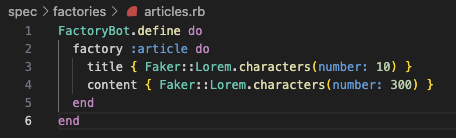
attributes_forは、factory_botで用意されている便利なメソッドのひとつ
これでリクエストを送ると、問題なくステータス「302」が返ってくるようになる
次は、「記事が保存されているか」を確認する方法を考える
記事が保存されているか、どう確認する?
  describe 'POST /articles' do
    it '記事が保存される' do
      article_params = attributes_for(:article)
      post articles_path({article: article_params})
      expect(response).to have_http_status(302)
      expect(Article.last.title).to eq(article_params[:title])
      expect(Article.last.content).to eq(article_params[:content])
    end
  end
パラメーターで送ったarticle_paramsの中身=最後に保存された記事の中身
以下が一致していれば、記事は保存できていることがわかる!
Article.last.title=article_params[:title]Article.last.content=article_params[:content]
このままのコードだとcontentだけエラーが起きる
Article.last.contentでは、contentの本文だけじゃなく、インスタンスとして返ってきてしまう

「文字列」を取得するにはどうしたらいいのか?
Article.last.content.body.to_plain_text
コンソール画面で上記のとおり入力してみる

文字列だけ取れた!
ひとまず完成したコードはこちら↓
  describe 'POST /articles' do
    it '記事が保存される' do
      article_params = attributes_for(:article)
      post articles_path({article: article_params})
      expect(response).to have_http_status(302)
      expect(Article.last.title).to eq(article_params[:title])
      expect(Article.last.content.to_plain_text).to eq(article_params[:content])
    end
  end
この状態でテストを実行しても失敗する
現状、ログインしていないからcreateが出来ず、失敗する
ログインの処理を書いていく
deviceにはsign_inというメソッドが用意されている
あとはuserと指定してしまえばログイン状態を作ることができる(簡単!)
  describe 'POST /articles' do
    context 'ログインしている場合' do
      before do
        sign_in user
      end

      it '記事が保存される' do
        article_params = attributes_for(:article)
        post articles_path({article: article_params})
        expect(response).to have_http_status(302)
        expect(Article.last.title).to eq(article_params[:title])
        expect(Article.last.content.to_plain_text).to eq(article_params[:content])
      end
    end
  end
rspecでdeviceの機能を使うためには、rspecに設定をする必要がある(今のままでは使えない)
spec/rails_helper.rbにFactoryBotの設定を書いたように、Deviseのincludeについても記載する
  config.include FactoryBot::Syntax::Methods
  config.include Devise::Test::IntegrationHelpers, type: :request
「request specでDeviceをインストールします」という意味になる
これで、ログインした状態でリクエストを送ることができる
3.ターミナルでテストを実行する
bundle exec rspec spec/requests/articles_spec.rb
成功!!

#DAY14